
December 2025
Welcome to the December 2025 release of Latner Software, the last one for 2025! We hope you all enjoy a Merry Christmas and a Happy New Year, and we look forward to supporting you in 2026.
This release delivers several highly requested enhancements across Bulk Stand Downs, Converting Equipment, Timesheets Input Type and Calendar Month Rate Type, along with a range of quality‑of‑life improvements and workflow refinements. Please see below for the full details of what has changed.
New Features
Bulk Stand Down for Rental Contracts
During public holidays, it is common to process stand downs for a number of customers. Rather than going into each rental contract and manually creating a stand down, users can create bulk stand downs for all rental contracts.
Converting Equipment
Businesses often need to adjust how their equipment is tracked as operational requirements evolve. Equipment conversion allows organisations to change an item’s tracking method such as converting from bulk to serialised, serialised to bulk, or even between similar types without losing historical data or disrupting asset management.
This flexibility supports real‑world scenarios like splitting a single serialised item into multiple serialised usable components, merging multiple equipment together, transitioning bulk items into individually tracked units for compliance or maintenance, or consolidating items back into bulk when individual tracking is no longer necessary.
By enabling these conversions, the system ensures equipment records remain accurate, aligned with current business processes, and ready for equipment and asset management.
Timesheets Input Type
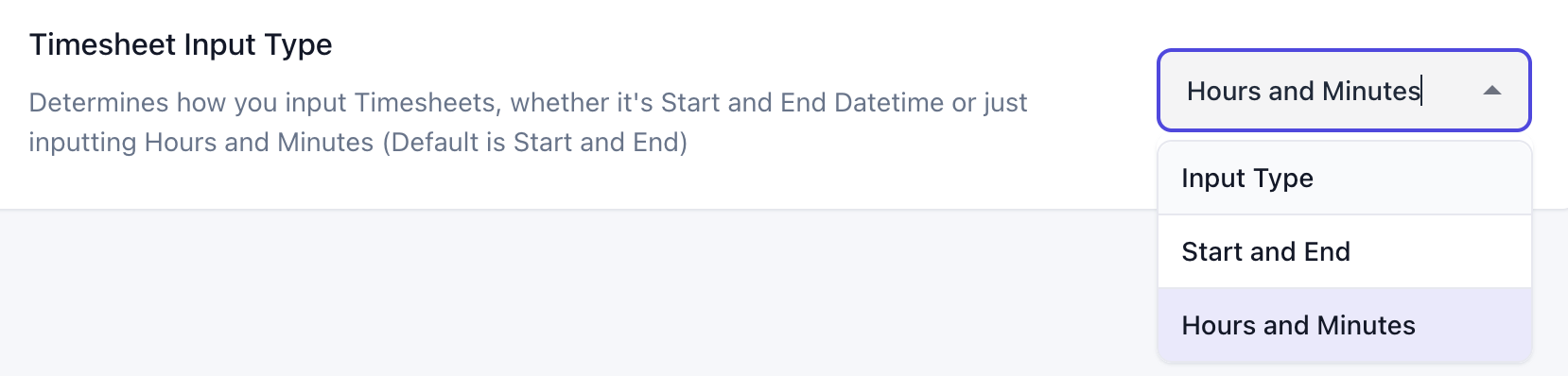
You can now choose how timesheets are entered either by specifying Start and End times or by entering total Hours and Minutes.
The current default is Start and End and should be used when you would like to capture the exact time period when work was completed. E.g. 12th December 2pm - 12th December 4pm
Hours and Minutes allows you to instead capture only the duration and date that work was completed. E.g. 4 hours on 12th December
Calendar Month Rate Type
We have added two new rate types Calendar Month and Calendar Month (Annualized).
To help with deciding which rate type is best suited for your needs we have detailed the differences below.
Comparing Monthly, Calendar Month & Calendar Month (Annualized)
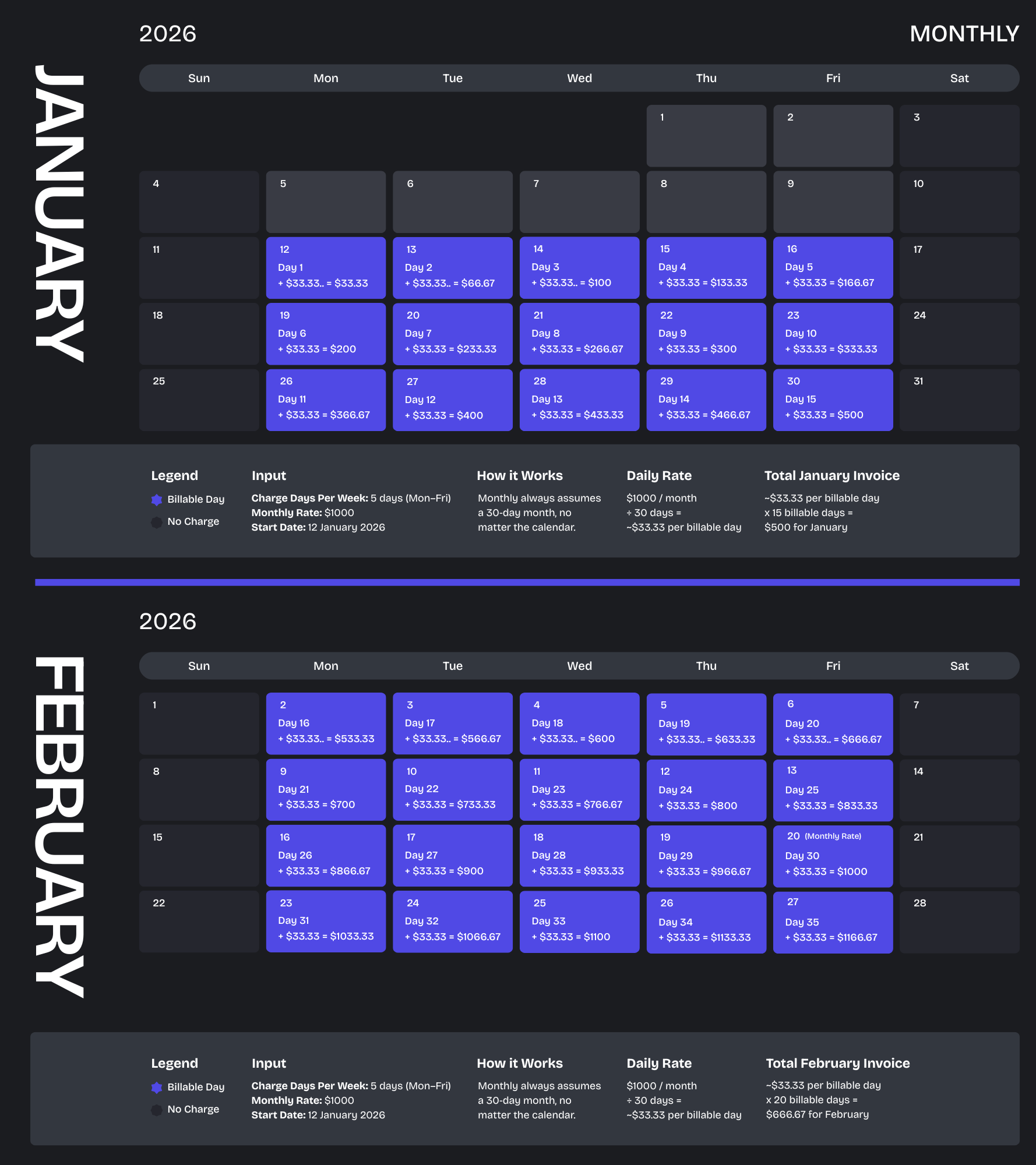
The Monthly method treats every billing cycle as a fixed 30‑day month. All billable days - based on your selected charge days per week - are prorated against this 30‑day period.
The Calendar Month method spreads the monthly rate evenly across all billable days in that specific month. The system first determines the total number of billable days in the month (based on your Charge Days Per Week), then prorates the charge by comparing the billable days within the hire period to the total billable days for that month.
The Calendar Month (Annualized) method spreads the annual cost (your monthly rate multiplied by 12) across all billable days within the 365 days of the year. The system calculates how many billable days fall within the hire period and prorates them against the days in the year. The annual total is then applied to that proration, ensuring a consistent daily value across the entire year.
Example
.png?inst-v=89681496-9e3a-4425-8523-31e45e06ff1b)
.png?inst-v=89681496-9e3a-4425-8523-31e45e06ff1b)
Other Updates & Improvements
Allow Stand Downs to be cancelled after invoicing
Added a tab for Sales Orders to the Customer Screen
Supplier Invoices can now be linked to CRM Projects
Stand Downs are now supported for Minimum Hours Per Month Rate Types
Equipment on Rental Contract Details is now linked and clickable
Invoice/Payment syncs now function correctly for Inactive customers
Allowed Sales Order Details to be individually fulfilled and invoiced
Changed Customer Damage Waiver to be the upper limit when an Equipment Class Damage Waiver is set
Plus a range of smaller fixes and performance improvements