
How do Rental Rates Work

This page explains how charge days per week, pricing methods, rate types, and modifiers all work together to shape billing in Latner.
Charge days per week define the schedule of billing, which then drives the chosen pricing method. Each pricing method flows down into specific rate types, and these rate types can be further refined with optional modifiers.
The content provides definitions, use cases, and FAQs to clarify complex scenarios such as minimum hours, excess usage, stand downs, and rental rate variations.
Charge Days Per Week
The Charge Days Per Week sets the cadence for how days are counted in rate types, except for Flat Monthly and Minimum Hours Per Month. When deriving daily rates from weekly or monthly rates, the number of charge days per week is the main factor.
It also ensures customers aren’t billed for non‑charge days (e.g., weekends in a 5 Days scheme)
5 Days: Monday–Friday
6 Days: Monday–Saturday
7 Days: Monday–Sunday
Saturday: Saturdays only
Weekends: Saturday-Sunday
This can be set on a header level which affects all in one contract but can be set on each detail line per equipment, if required.
Pricing Methods
The overall pricing structure for how Rate Types are applied. This is the top level of rates and works Rate Types in conjunction with the Charge Days Per Week.
Fixed Pricing
Definition: One rate type per period (Daily, Weekly, 24hr Variations, Monthly, Calendar Month, Calendar Month (Annualized), Flat Monthly, Hourly, Minimum Hours Per Month)
Use case:
Simple, predictable, and easy to explain.
Best for long-term contracts or customers who want budget certainty.
Example:
Flat Monthly at $5,000 → every month is billed $5,000 from start date to the day before the same date next month.
Daily/Weekly Pricing
Definition: Two rate type tiers - Daily and Weekly, based on Charge Days Per Week.
Use case:
Flexible for customers with uncertain hire lengths.
Ensures fairness by automatically switching to weekly if it’s cheaper than stacking daily rates.
Example:
Daily = $200/day, Weekly = $900/week.
Hire = 10 days.
Daily = $2,000; Weekly = $1,700 → weekly tier applies.
Tiered Pricing
Definition: One or more rate type tiers triggered by Days On Rent thresholds. (Daily, Weekly, 24hr Variations, Monthly, Hourly)
Use case:
Scales pricing with hire length.
Rewards longer hires with lower effective rates.
Example:
Tier 1: 0–6 days → Daily.
Tier 2: 7–30 days → Weekly.
Tier 3: 30+ days → Monthly.
Hire = 25 days → lands in Tier 2 → Weekly rate applies.
Operator Pricing
TBC
Rate Types
The specific type of billing used and sub level within Pricing Methods.
Daily
Definition: Charges per billing day at the daily rate.
Use Case: Short hires where customers want clear day‑by‑day costs.
Daily (24hr)
Definition: Each billing day runs as a full 24‑hour window from the hire start time.
Use Case: Precise hires where timing matters (e.g., exact start/end times).
Weekly
Definition: Charges per billing week at the weekly rate.
Use Case: Medium‑length hires where weekly budgeting is easier.
Weekly (24hr)
Definition: Each billing week runs in continuous 7‑day windows from the hire start time.
Use Case: Hires where exact start/end times define the billing week.
Monthly
Definition: Treats every month as a fixed 30‑day billing period, with proration if the hire is shorter.
Use Case: Longer term hires with simple, consistent billing.
Flat Monthly
Definition: A fixed monthly fee from the hire start date through to the day before the same date in the following month.
Use Case: Long‑term hires where customers want predictable, fixed monthly costs.
Calendar Month
Definition: Charges based on the actual number of days in each calendar month. The system prorates the rate according to the real month’s length (e.g., 28, 30, or 31 days).
Use Case: Billing scenarios where charges must reflect true calendar usage, ensuring shorter months cost less and longer months cost more.
Calendar Month (Annualized)
Definition: Calculates an annual amount based of the monthly rate and spreads it evenly across all 365 days of the year. It will not take into account the Charge Days Per Week when calculating.
Use Case: Businesses that want a consistent daily rate across the entire year, even including weekends and public holidays.
Minimum Hours Per Month
Definition: Accrues charge hours per day until a monthly minimum of hours is reached. Excess hours from meter reading are charged every month.
Use Case: Equipment where meter reading usage varies but a minimum commitment is required.
Modifiers
These are additional rules applied on top of the rate types within a pricing method. These are normally optional and can be skipped but it adds more control towards rates, if required.
Minimum Charge: Acts as a floor - if the base charge is lower than the minimum, the minimum applies. Used for Daily, Weekly, 24hr Variants, Monthly, Calendar Month, Calendar Month (Annualized) & Flat Monthly rate types.
Excess Hours Rate: Adds charges if average daily usage based off the meter reading exceeds the Max Daily Hours across the days the equipment is on rent. Used for Daily, Weekly, 24hr Variants, Monthly, Calendar Month, Calendar Month (Annualized) & Flat Monthly rate types.
Grace Period: Allows a buffer (in minutes) before the extra day is counted to be charged upon off hire. Only used for 24hr rate types. This is configurable in Global Settings.
Stand Downs: Pauses/discounts billing for agreed non‑charge periods (excludes Flat Monthly rates)
Bringing it Altogether
Now that we understand each pricing definition, we can bring everything together to build the rental rates that powers our rental quotes and contracts.
Set Charge Days Per Week - Choose which days count as billable. You can set this at the header level (applies to all details) or override it on individual details when you need different patterns.
Select a Pricing Method - Choose the Pricing Method for overall structure that best represents how your rate types should behave and work together.
Choose Rate Type(s) - If needed, select one or more Rate Types that will drive the calculations. You can combine multiple Rate Types to support tiered complex pricing methods.
Enter Rates - Enter the rate values for each selected Rate Type so the system can calculate charges correctly.
Apply Modifiers (Optional) - Add any Modifiers to layer extra pricing rules such as excess hours or minimum charges on top of your existing structure.
FAQs
How does tier system work for Daily/Weekly or Tiered Pricing Methods?
Tiered Pricing assigns each rate type (Daily, Weekly, Monthly, etc.) its own price and Days On Rent requirement, which determines when that tier becomes eligible. Daily and Weekly rates use the contract’s Charge Days Per Week to work out how the Days On Rent requirement while Tiered Pricing is manually entered.
As the hire continues, the system evaluates each tier that are currently eligible based on the number of days the equipment has been on rent. For each eligible tier, it works out what that tier would cost by converting the rate into a daily‑equivalent value and multiplying it by the tier’s Days On Rent. After comparing these totals, the system selects the tier that produces the lower cost and applies that rate to the current day of the hire.
This calculation is performed at each invoice, taking into account the amount previously billed so the customer is always charged using the correct tier for their current Days On Rent. If the hire has continued beyond what was covered on the last invoice, the system reassesses the applicable tier and compares the newly‑calculated charge with what has already been billed. If the newer tier results in a lower total, the system simply charges the difference.
Example:
Daily / Weekly Pricing Method
Input: Charge Days Per Week of 6 days; Daily $50; Weekly $180
Calculation:
Day 1 = $50, Day 2 = $100, Day 3 = $150 (uses Daily Rate)
Day 4 to Day 6 = $180 (jumps to Weekly Rate since $180 < $50 x 4 = $200)
Day 7 = $210 (uses Weekly Rate)
Tiered Pricing Method
Input: Charge Days Per Week of 5 days; Daily $50; Weekly $180 with Days On Rent 8.
Calculation:
Day 1 = $50, Day 2 = $100, Day 3 = $150, Day 4 = $200, Day 5 = $250 (uses Daily Rate)
Day 6 to Day 8 = $288 (jumps to Weekly Rate since $180 / 5 = $36 x 8 = $288 < $50 x 6 = $300)
Day 9 = $324 (uses Weekly Rate)
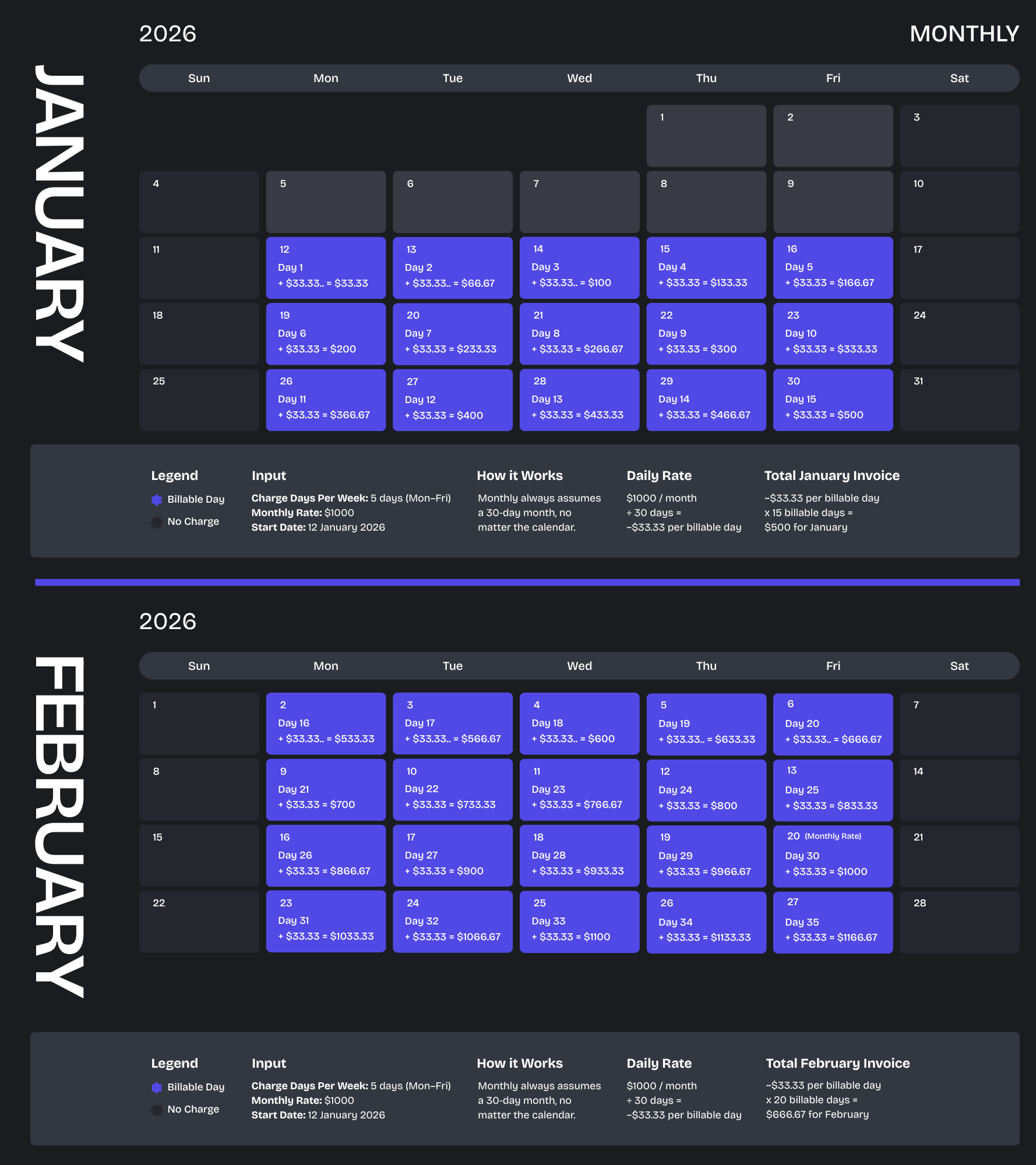
What is the difference between Monthly & Calendar Month & Calendar Month (Annualized)?
The Monthly method treats every billing cycle as a fixed 30‑day month. All billable days - based on your selected charge days per week - are prorated against this 30‑day period.
The Calendar Month method spreads the monthly rate evenly across all billable days in that specific month. The system first determines the total number of billable days in the month (based on your Charge Days Per Week), then prorates the charge by comparing the billable days within the hire period to the total billable days for that month. The monthly rate is applied to that proration to produce the final charge.
The Calendar Month (Annualized) method spreads the annual cost (your monthly rate multiplied by 12) across all billable days within the 365 days of the year. The system calculates how many billable days fall within the hire period and prorates them against the days in the year. The annual total is then applied to that proration, ensuring a consistent daily value across the entire year.
Example
.png?inst-v=89681496-9e3a-4425-8523-31e45e06ff1b)
.png?inst-v=89681496-9e3a-4425-8523-31e45e06ff1b)
How does Minimum Hours Per Month Rate Type work?
Minimum Hours Per Month is a rate type designed to ensure a consistent minimum monthly charge while still accurately billing for any additional usage. It uses four values - the Meter Reading, the Hourly Rental Rate, the Minimum Hours Per Month, and the Default Charge Hours Per Day (set in Global Settings)
The system automatically accrues the Default Charge Hours Per Day until the accumulated total reaches the Minimum Hours Per Month, with the calculation also adjusting proportionally based on how far through the month the hire has progressed. Once the minimum threshold is met, it remains fixed for the rest of the month and resets to count again when the next month begins.
Alongside this automatic accrual, the system also evaluates the Meter Reading taken at any point during the hire. If the recorded usage exceeds the Minimum Hours Per Month, the system charges the additional hours at the standard hourly rate. It also tracks the meter reading proportionally across the entire hire, increasing the minimum hour threshold by the Default Charge Hours Per Day as each day passes - so the meter reading is compared against the minimum usage that should have accumulated by that point in time. If the recorded usage exceeds that proportional minimum, the system charges the additional hours at the Hourly Rental Rate.
This ensures that the customer is billed fairly for both minimum expected usage across all months and any genuine excess.
How does Excess Hours Rate work?
Each hire includes a set number of hours per day (for example, 8 hours) called Max Daily Hours. Over the course of the hire, these set hours are calculated against the number of billable days (for example, 15 day hire will clock in at 120 hours max).
Once the hire ends, meter reading needs to be entered on Return. If the meter reading usage entered is higher than the allowed limit, the extra hours are billed separately at the Excess Hours Rate.
This ensures that customers who use equipment more intensively pay fairly for the additional wear, fuel, or operator time, while those who stay within the limit are only charged the standard rate.
What are Rental Rate Variations?
Rental Rate Variations allow you to define multiple versions of the same Pricing Method and/or Modifiers within a Rental Rate. This means an Equipment Class, Model, or Number can have several daily rate options, each representing a different pricing variation e.g. standard, discounted, seasonal, or contract‑specific rates.
These variations are first set up on Rental Rates. When selecting a variation on a contract or quote, the system will display all variations for that equipment so you can choose the most appropriate one.
How does Stand Down affect the charges?
Stand downs work by converting the discount percentage into a proportional reduction of chargeable days. When a stand down is applied, the system reduces the total Days On Rent by that proportional amount and then recalculates the charges based on the adjusted total days. All normal tiered‑rate rules still apply, so the system continues to follow daily, weekly, or monthly thresholds exactly as it would without a stand down.
A common point of confusion is why a stand down doesn’t reduce the charge when the hire hasn’t yet completed a weekly cycle. Even if the adjusted billable days fall below the weekly threshold, the system will still charge the weekly rate once the hire has entered that tier. The stand down isn’t lost - it simply doesn’t affect the charge until the full weekly period has been completed. Once the hire moves past that weekly cycle, the stand‑down adjustment is applied correctly within the next billing period.
Stand Down Example
Daily rate: $100
Weekly rate: $250
Charge Days Per Week: 5 days
Scenario:
Equipment is on hire for 4 days. Customer receives a 50% stand down for 1 day, which equals 0.5 stand‑down days. Billable days = 4 − 0.5 = 3.5 days.
Even though the billable days reduce to 3.5, the system still charges the weekly rate of $250 and not $225. The weekly rate will not be reduced until the full weekly cycle (5 days) is completed.
Once the hire exceeds 5 days, the stand‑down adjustment is applied correctly within the next billing cycle.
How to set Floor Rates and Request Approval
Floor rates are used to prevent undercharging by enforcing a minimum allowable rate for equipment. These are first configured within the Rental Rates configuration. Once floor rates are set and assigned to the appropriate customer, the system will validate equipment pricing during adding details on the rental contract
If a user attempts to enter an equipment rate below the defined floor rate on a rental contract, the system will block the entry and display an error message.

To override this restriction, users can initiate a discount approval request to another user with the permission that will not be blocked.

Navigate to the Options menu within the Rental Contract.
Select Request Discount Approval.
Choose a user with permission to approve discounts.
Provide a description explaining the reason for the request.
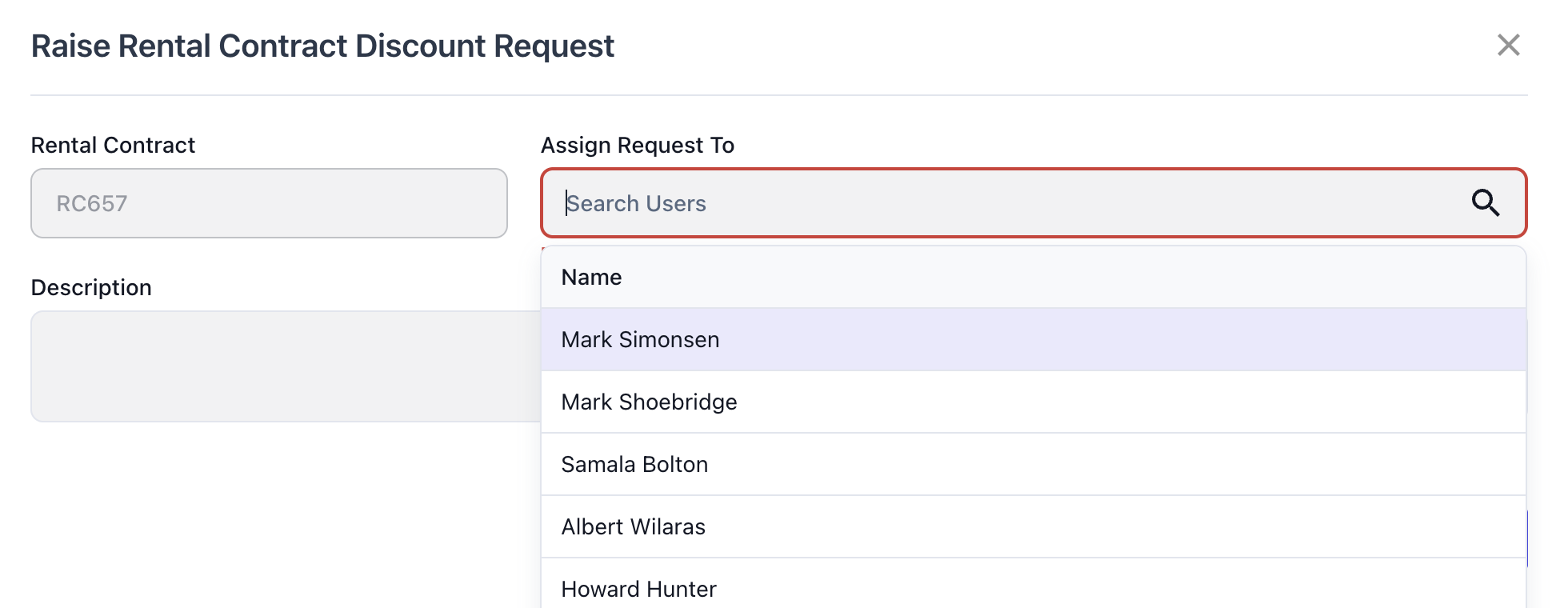
Submitted requests are recorded under the Discount Requests tab on the rental contract, allowing teams to track, review, and manage all active and historical discount approvals.
